文字  

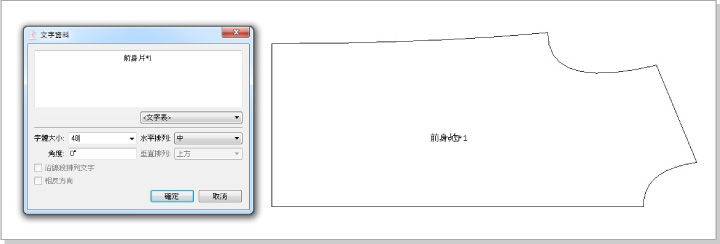
輸入新文字:
( 1 ) 點選
( 2 ) 在想要加文字的地方點擊一下
( 3 ) 在對話框內輸入要加的文字
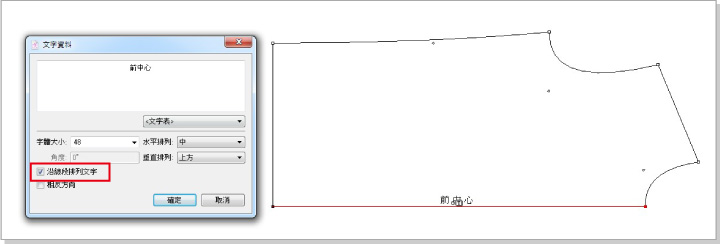
沿線段排列文字:
( 1 ) 用
 選取該線段
選取該線段( 2 ) 點選
( 3 ) 點擊該線段的起點或終點
( 4 ) 在對話框內輸入要加的文字,並勾選 沿線段排列文字
修改文字:
( 1 ) 用
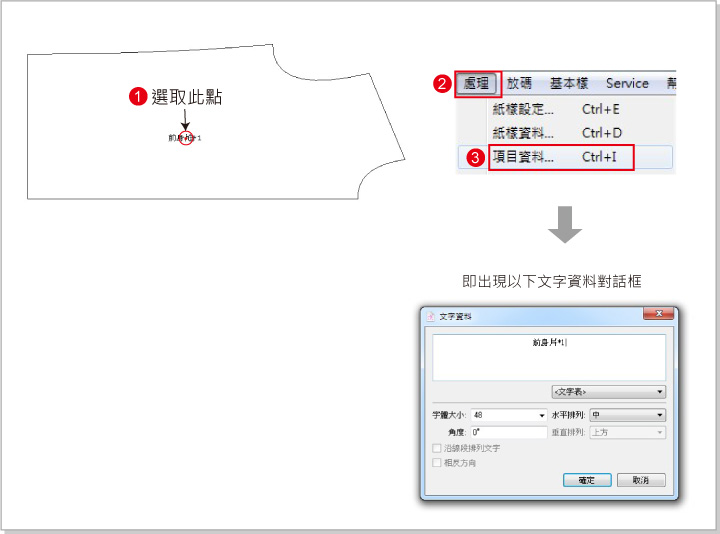
選取該文字( 2 ) 點選 處理 → 項目資料
( 3 ) 彈出對話框,即可修改文字
¶輸入新文字:
( 1 ) 點選
( 2 ) 在想要加文字的地方點擊一下
( 3 ) 在對話框內輸入要加的文字
沿線段排列文字:
( 1 ) 用 選取該線段
( 2 ) 點選
( 3 ) 點擊該線段的起點或終點
( 4 ) 在對話框內輸入要加的文字,並勾選 沿線段排列文字
修改文字:
( 1 ) 用 選取該文字
( 2 ) 點選 處理 → 項目資料
( 3 ) 彈出對話框,即可修改文字